Configuration JSON
StyleCore creates and updates its JSON configuration from inside QGIS. This page is a complete reference to what can be stored in that file and how those values are normally maintained. For the practical QGIS workflow, see Configuration – In QGIS.
1. What the JSON is for
The JSON stores the shared configuration that teammates use together. It can contain:
- the configuration name and identity,
- where the shared resource root is,
- folder names for styles, templates and layouts,
- shared automatic layer-style rules,
- File Suffix Rules,
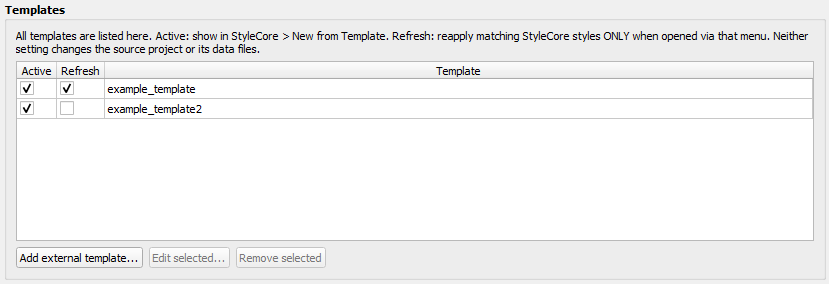
- template settings such as Active, Refresh and external templates,
- and the developer confirmation code.
It does not store each user's Personal Overrides. Those stay in the local QGIS profile.
2. Two main patterns: simple root vs. separate rules
Most teams start with a simple root-based setup:
layer_stylescontains the QML files,template_projectscontains the templates,layoutscontains the QPT files,- and StyleCore finds matching resources from the root and folder names.
When you need more control, the JSON can also store explicit rules:
- a layer name can point to a specific QML file,
- a file suffix rule can point to a QML file,
- and a template can be referenced by path even when it lives outside the normal templates folder.
3. Example configuration
Expand JSON example
{
  "name": "Office",
  "config_id": "unique-id-created-by-stylecore",
  "root_mode": "config_dir",
  "root_folder": "",
  "save_paths": "relative",
  "folders": {
    "styles": "layer_styles",
    "templates": "template_projects",
    "layouts": "layouts"
  },
  "style_rules": [
    {"layer": "Buildings", "style": "Buildings.qml"},
    {"layer": "Survey points", "style": "custom/survey_points.qml"}
  ],
  "file_suffix_styles": [
    {"suffix": "-survey", "extension": ".geojson", "style_filename": "Survey.qml"},
    {"suffix": "-points", "extension": "*", "style_filename": "QGIS/points.qml"}
  ],
  "external_templates": [
    {"name": "Regional Map", "path": "other_projects/region.qgz"}
  ],
  "inactive_templates": ["Archive/Old_Map"],
  "restyle_on_open": ["Base_Map", "Regional Map"],
  "developer_code": "replace-with-your-own-code"
}
The exact config_id is generated by StyleCore. Some paths may be stored relative to the resource root.
4. Complete field reference
| Field | What it does | How it is usually maintained |
|---|---|---|
name |
Display name shown in QGIS | Set when creating the configuration |
config_id |
Internal ID used to separate local preferences between configurations | Created automatically by StyleCore |
root_mode |
Controls whether the resource root comes from the JSON folder (config_dir) or a separate path (custom) |
Set at configuration creation |
root_folder |
Absolute custom root when root_mode is custom |
Maintained in Developer settings |
folders.styles |
Name of the styles subfolder | Set at configuration creation |
folders.templates |
Name of the templates subfolder | Set at configuration creation |
folders.layouts |
Name of the layouts subfolder | Set at configuration creation |
save_paths |
Whether projects created from templates prefer relative or absolute paths | Maintained in the JSON / configuration maintenance |
style_rules |
Shared layer-name → QML mappings | Maintained in Developer → Shared automatic layer styles |
file_suffix_styles |
Suffix + extension → QML mappings | Maintained in Developer → File Suffix Rules |
external_templates |
Named template references outside the normal templates folder | Maintained in Developer → Templates |
inactive_templates |
Template IDs hidden from New from Template | Maintained in Developer → Templates → Active |
restyle_on_open |
Template IDs that should refresh matching styles when opened from StyleCore | Maintained in Developer → Templates → Refresh |
developer_code |
Confirmation code for shared edits | Set when creating the configuration |
5. Understand the root settings
root_mode: "config_dir"
This means the folder containing the JSON file is the resource root.
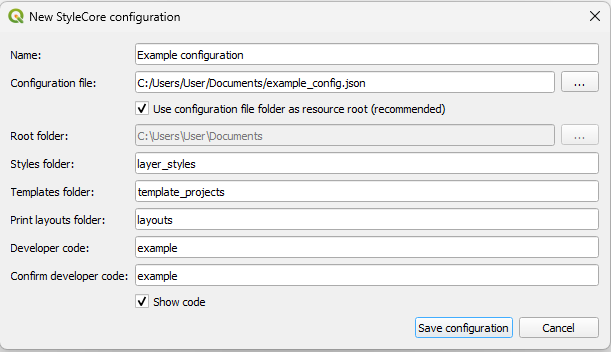
This is the easiest setup to move, copy and explain to colleagues.
root_mode: "custom"
This means the JSON file points to a separate root folder.
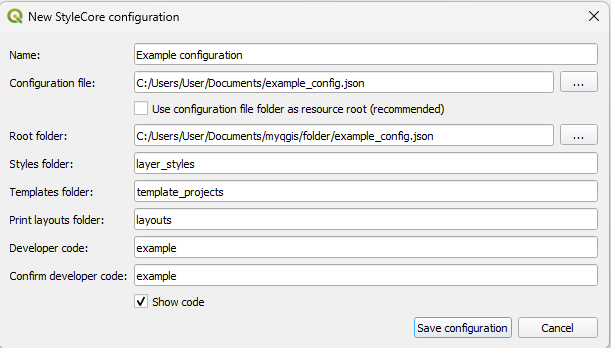
This is useful for a dedicated shared drive or an established existing folder structure.
6. Understand shared style rules
If a QML file already sits in the styles folder and matches the layer name, no explicit rule is needed. But if the layer name and QML filename differ, StyleCore stores an entry in style_rules.
Typical simple rule:
A more specific rule can point to a different filename or a QML in another subfolder under the resource root:
"style_rules": [
  {"layer": "Survey points", "style": "custom/survey_points.qml"},
  {"layer": "Road centerline", "style": "roads/centreline.qml"}
]
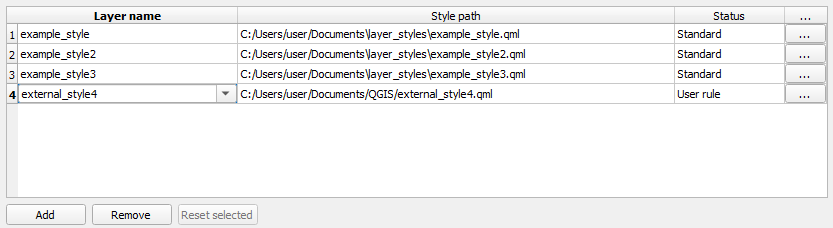
style_rules.7. Understand File Suffix Rules
File Suffix Rules are stored in file_suffix_styles. They are used when a layer should be styled based on its source filename, not only its visible QGIS layer name.
Typical examples:
"file_suffix_styles": [
  {"suffix": "-points", "extension": "*", "style_filename": "QGIS/points.qml"},
  {"suffix": "-observations", "extension": ".geojson", "style_filename": "QGIS/obs.qml"},
  {"suffix": "polygons", "extension": ".shp", "style_filename": "QGIS/poly.qml"}
]
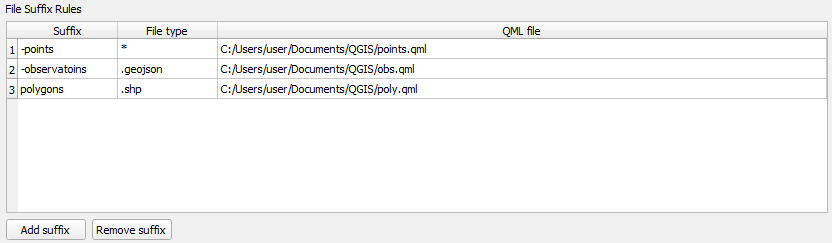
Use File Suffix Rules when:
- exports follow a naming convention,
- several layers share a common suffix,
- or the visible layer name is not reliable enough on its own.
8. Understand template storage in the JSON
Templates normally come from the configured templates folder. In that case, the JSON only needs to track whether they are Active or Refresh.
If a template should live elsewhere, StyleCore stores it in external_templates.
Example:
"external_templates": [
  {"name": "Regional Map", "path": "other_projects/region.qgz"},
  {"name": "Field package", "path": "D:/GIS/field_package.qgz"}
]
inactive_templates stores the templates that should not appear in New from Template.
restyle_on_open stores the templates that should reapply matching styles when opened through StyleCore.
9. How to maintain the JSON safely
Normally, you should not edit the JSON by hand unless needed. The preferred workflow is:
- Load the correct configuration.
- Open Settings → Options → StyleCore.
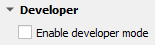
- Enable Developer Mode when you need shared changes.
- Make the changes in the appropriate section.
- Click Apply / OK and confirm with the developer code.
- Ask colleagues to reload the configuration if needed.
Useful maintenance entry points:

The JSON is especially maintained through:
- Configuration creation for root mode, folder names and developer code,
- Developer → root folder for a custom root location,
- Developer → Templates for Active / Refresh / external templates,
- Developer → Shared automatic layer styles for
style_rules, - Developer → File Suffix Rules for
file_suffix_styles.
10. Safe manual editing
If you do need to edit the JSON directly:
- Make a backup first.
- Keep the JSON valid.
- Do not change
config_idunless you intentionally want StyleCore to treat it as a different configuration. - Preserve the relative structure if the configuration depends on
config_dir. - After editing, reload the configuration in QGIS and test templates, styles and layouts.
Personal Overrides and the user's selected configuration path are not stored in the shared JSON. Those belong to the local QGIS profile.