All Features
StyleCore connects QGIS users to shared or local styles, project templates, print layouts and optional fonts. Shared resource folders help teams stay consistent as styles and templates evolve.
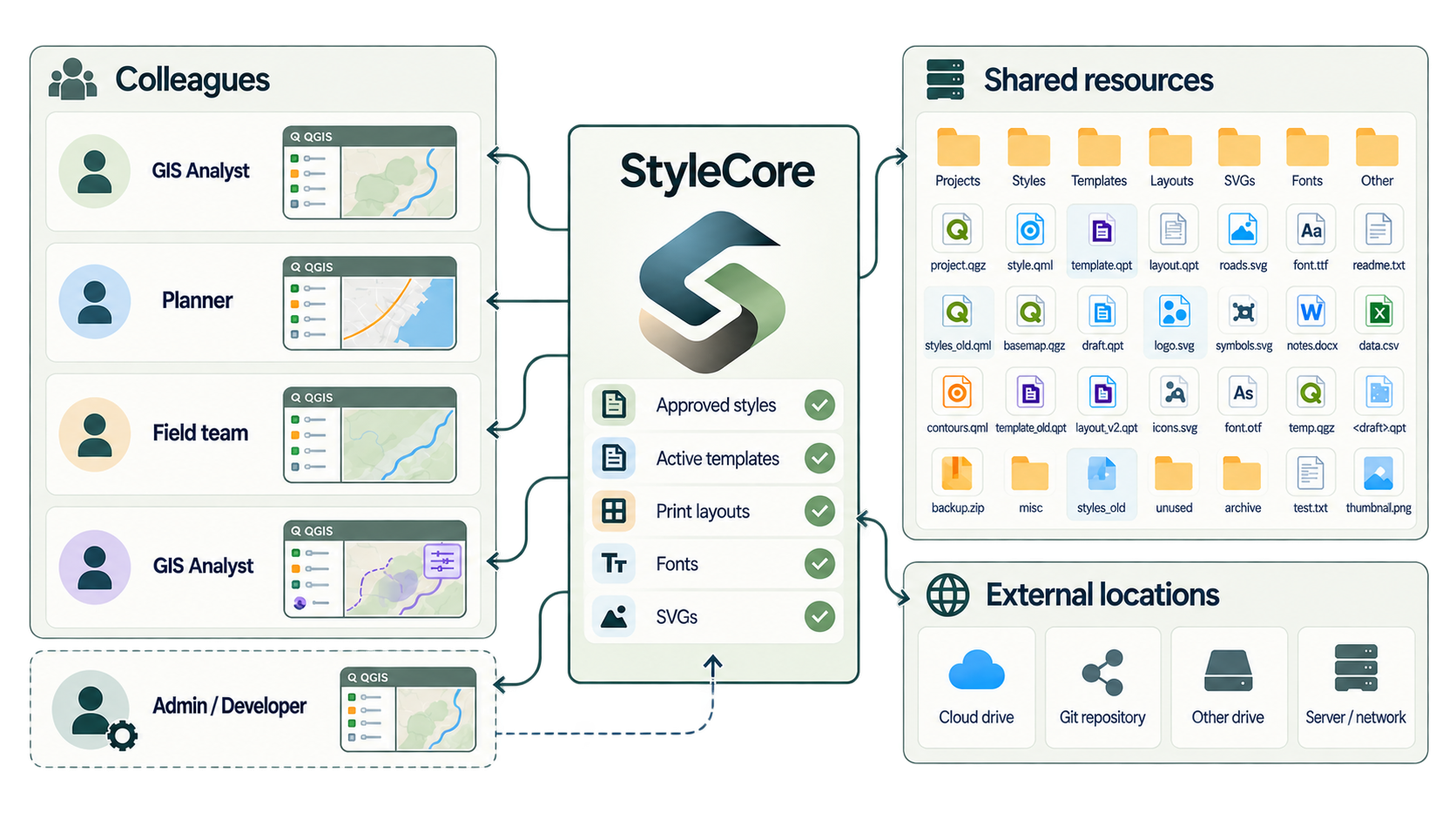
Connect
Bring your team together through shared QGIS resources.
Create
Build projects faster with ready-to-use styles, templates and layouts.
Stay consistent
Keep every project aligned as your shared resources evolve.
This is a quick overview; each link leads to step-by-step instructions.
Configuration
- Share a single config on a network drive (including UNC paths).
- Colleagues use the same shared configuration and can reload it when shared settings change.
- Create or load a JSON configuration directly inside QGIS.
- Keep JSON and resource folders together for a portable setup, or use a separate resource root.
- Keep shared rules in JSON while personal preferences remain local.
Set up Configuration → · Configuration JSON fields →
Layer Styling
- Automatically apply QML styles to newly added layers.
- Match by visible layer name, shared layer rule, File Suffix Rule, or Personal Override.
- Keep personal QML choices local with Personal Overrides, without changing the shared setup.
- Toggle Automatic Styling from the StyleCore menu.
- Apply QML manually to a selected existing layer without creating a shared rule.
- Save selected project-layer styles to shared QMLs with Developer Mode.
Use and maintain Layer Styling →
Project Templates
- Open shared
.qgs/.qgzfiles directly, without local template copies. - Find templates in the configured root and subfolders.
- Link external templates located elsewhere.
- Configure Active (shown in menu) and Refresh (reapply matching QML on opening) separately.
- Start new, unsaved projects from templates to protect the shared originals.
Create and maintain Project Templates →
Print Layouts
- Open shared
.qptfiles from the StyleCore menu. - Initialize
main_mapandmini_mapfrom the current QGIS canvas. - Activate Move Item Content for
main_mapwhere supported. - Match SVGs to layout Picture items by Item ID — for example
logo→logo.svgornorth_arrow→north_arrow.svg. - Create multiple layouts without overwriting existing layouts.
Create and maintain Print Layouts →
Fonts, maintenance and support
- Optionally register
.ttf/.otffonts fromroot/fontsin QGIS. - Use Developer Mode for shared settings and QML saves, with code confirmation and filesystem permissions.
- Help and issue links are available directly from the StyleCore menu.