Installation
Install StyleCore in QGIS first. You can then load your team's shared configuration or create your own.
1. Check the requirements
- QGIS 3.44 or later. StyleCore 1.9.0 declares compatibility with QGIS 3.44 and 4.x.
- Access to a network drive or other shared data sources only if your team's configuration uses them.
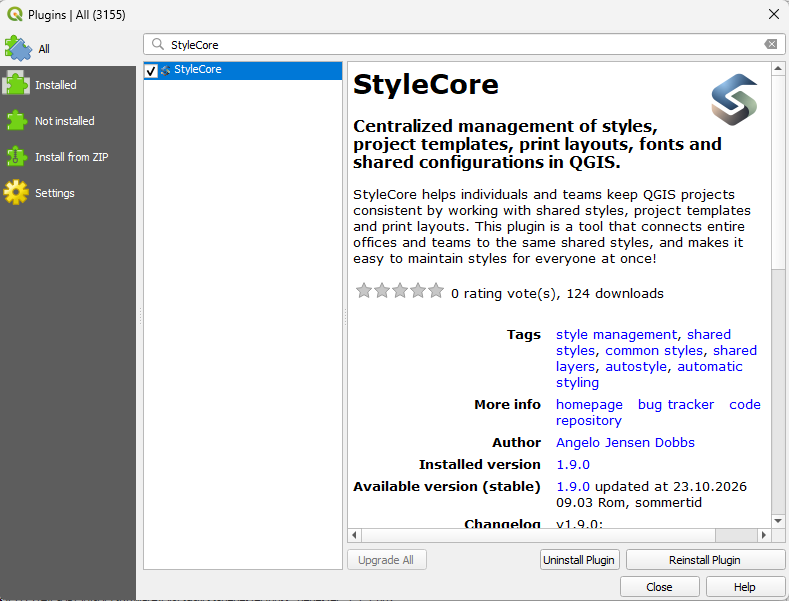
2. Install from QGIS (recommended)
StyleCore is available in the official QGIS Plugin Repository. This is the simplest way to install the plugin and receive updates.
- Open QGIS and go to Plugins → Manage and Install Plugins….
- Select All and search for StyleCore.
- Select StyleCore and click Install Plugin.
- Close the plugin manager. Open the StyleCore toolbar menu to get started.
Cannot find StyleCore?
Make sure the official QGIS plugin repository is enabled in the Settings tab of the plugin manager and that QGIS has internet access. Check your QGIS version if the plugin is still not listed.
3. Alternative: install a ZIP from GitHub
Use this method when you prefer a manual installation or cannot use the plugin catalogue.
- Open the latest StyleCore release on GitHub.
- Under Assets, download the release file named
StyleCore_vX.Y.Z.zip(use the current version). - In QGIS, open Plugins → Manage and Install Plugins… → Install from ZIP.
- Select the downloaded ZIP and click Install Plugin.
- Open the StyleCore toolbar menu.
Choose the plugin ZIP, not the source-code ZIP
GitHub's automatically generated Source code (zip) archive is not the packaged QGIS plugin. Download the StyleCore_vX.Y.Z.zip file under the release's Assets instead. You do not need to extract the plugin ZIP before installing it.
Plugin and configuration are separate
Installing StyleCore does not include your organization's shared QML styles, project templates, print layouts or JSON configuration. Load or create a configuration after installing the plugin.